outputLib.thumbs Examples
Comprehensive examples of all geeViz.outputLib.thumbs output types: single thumbnails, animated GIFs, filmstrip grids, multi-feature grids, and map+chart GIFs.
Covers: basemap compositing, legends (thematic + continuous), scalebar/north arrow, inset overview maps, geometry burn-in, clip-to-geometry, CRS/projection control, font sizing, and theme options.


Setup
import geeViz.geeView as gv
import geeViz.getImagesLib as gil
from geeViz.outputLib import thumbs as tl
import geeViz.getSummaryAreasLib as sal
from IPython.display import Image, display, HTML
import os

ee = gv.ee

# Output directory
output_dir = os.path.join(os.path.dirname(os.path.abspath("__file__")), "outputs", "thumbLib_examples")
os.makedirs(output_dir, exist_ok=True)
print(f"Output dir: {output_dir}")
Output dir: c:\RCR\geeVizBuilder\geeViz\examples\outputs\thumbLib_examples
Define Study Areas, Projections, and Datasets
# Study area

yellowstone_pt = ee.Geometry.Point([-110.5, 44.6]).transform('EPSG:3857')
# print(yellowstone_pt)
study_area = sal.simple_buffer(yellowstone_pt,15000)

# Multi-feature study areas using the updated simple_buffer method.
# Directly pass ee.Geometry.Point to simple_buffer (no coordinate extraction needed).

features = ee.FeatureCollection([
    ee.Feature(sal.simple_buffer(ee.Geometry.Point([-110.6, 44.65]), 8000), {"name": "Old Faithful"}),
    ee.Feature(sal.simple_buffer(ee.Geometry.Point([-110.35, 44.55]), 8000), {"name": "Yellowstone Lake"}),
])

four_features = ee.FeatureCollection([
    ee.Feature(sal.simple_buffer(ee.Geometry.Point([-110.6, 44.65]), 8000), {"name": "Old Faithful"}),
    ee.Feature(sal.simple_buffer(ee.Geometry.Point([-110.35, 44.55]), 8000), {"name": "YS Lake"}),
    ee.Feature(sal.simple_buffer(ee.Geometry.Point([-110.5, 44.7]), 8000), {"name": "Mammoth"}),
    ee.Feature(sal.simple_buffer(ee.Geometry.Point([-110.4, 44.45]), 8000), {"name": "South Entrance"}),
])

# CRS options
crs_utm = "EPSG:32612"
crs_albers = "EPSG:5070"

# Thematic: LCMS Land Cover
lcms = ee.ImageCollection("projects/gtac-data-publish/assets/LCMS/Product_Version/2025-11").select(["Land_Cover"]).filterBounds(yellowstone_pt)
lcms_single = lcms.filter(ee.Filter.calendarRange(2024, 2024, "year")).first()

# Multi-year LCMS for filmstrip/GIF
years_short = [2000, 2010, 2020, 2024]

lcms_ic = lcms.filter(ee.Filter.inList('year',years_short))

# Continuous: S2 composites
startYear, endYear = 2020, 2024
s2 = gil.superSimpleGetS2(
    study_area, f"{startYear}-01-01", f"{endYear}-12-31", 152, 273
)

def annual_composite(yr, imgs):
    yr = ee.Number(yr)
    filtered = imgs.filter(ee.Filter.calendarRange(yr, yr, "year"))
    return filtered.median().set(filtered.first().toDictionary()).set(
        "system:time_start", ee.Date.fromYMD(yr, 6, 1).millis())

s2_composites = ee.ImageCollection(
    ee.List.sequence(startYear, endYear).map(lambda yr: annual_composite(yr, s2))
)
s2_single = annual_composite(2024, s2)

# Add NDVI
s2_single_ndvi = gil.simpleAddIndices(s2_single).select("NDVI")
s2_composites_ndvi = s2_composites.map(
    lambda img: gil.simpleAddIndices(img).select("NDVI").copyProperties(img, ["system:time_start"])
)

# Viz params
viz_false = {"min": 500, "max": [5000, 6000, 6000], "bands": "swir1,nir,red", "gamma": 1.6}
viz_ndvi = {"bands": ["NDVI"], "min": 0, "max": 0.8, "palette": "brown,yellow,green"}

print("Setup complete")
Setup complete
1. Single Thumbnails - generate_thumbs()
Thematic data with basemap, legend, scalebar, north arrow
# 1a. Thematic, default: no basemap, with legend and north arrow
r = tl.generate_thumbs(
    lcms_single, study_area,
    output_path=os.path.join(output_dir, "01a_thematic_default_no_basemap.png"),
)
display(Image(data=r["bytes"]))
print("Default Thematic | No basemap | Legend + scalebar + north arrow")
# 1b. Thematic, satellite basemap

# List what basemaps are available and then show a couple
basemaps = tl.get_basemap_presets()
print(basemaps)

for basemap in basemaps[-2:]:
    r = tl.generate_thumbs(
        lcms_single, study_area,
        basemap=basemap,
        burn_in_legend=True, scalebar=True, north_arrow=True,
        output_path=os.path.join(output_dir, f"01b_thematic_{basemap}_basemap.png"),
    )
    display(Image(data=r["bytes"]))
    print(f"Thematic | {basemap} basemap | Legend + scalebar + north arrow")
# 1c. Thematic, topo basemap, inset ON the map (lower overlay opacity)
r = tl.generate_thumbs(
    lcms_single, study_area,
    basemap="esri-topo",
    burn_in_legend=True, scalebar=True, north_arrow=True,
    inset_map=True, inset_on_map=True,overlay_opacity=0.4,
    output_path=os.path.join(output_dir, "01c_thematic_topo_inset_on_map.png"),
)
display(Image(data=r["bytes"]))
print("Thematic | Topo basemap | Inset ON map (lower-right corner) | Overlay Opacity 0.4")
# 1d. Thematic, satellite basemap, inset OFF map (in legend column)
r = tl.generate_thumbs(
    lcms_single, study_area,
    basemap="esri-satellite",
    burn_in_legend=True, scalebar=True, north_arrow=True,
    inset_map=True, inset_on_map=False,
    output_path=os.path.join(output_dir, "01d_thematic_inset_off_map.png"),
)
display(Image(data=r["bytes"]))
print("Thematic | Satellite basemap | Inset OFF map (in legend column)")
2. Geometry Burn-in & Clip Options
# 2a. White outline, clipped to geometry (default)
r = tl.generate_thumbs(
    lcms_single, study_area,
    basemap="esri-satellite",
    burn_in_legend=True, scalebar=True, north_arrow=True,
    burn_in_geometry=True, geometry_outline_color="white", geometry_fill_color="#F004",clip_to_geometry=True,
    output_path=os.path.join(output_dir, "02a_burnin_white_clipped.png"),
)
display(Image(data=r["bytes"]))
print("White outline | Clipped to geometry")
# 2b. Green outline, NOT clipped
r = tl.generate_thumbs(
    lcms_single, study_area,
    basemap="esri-satellite",
    burn_in_legend=True, scalebar=True, north_arrow=True,
    burn_in_geometry=True, geometry_outline_color="green", clip_to_geometry=False,
    output_path=os.path.join(output_dir, "02b_burnin_green_unclipped.png"),
)
display(Image(data=r["bytes"]))
print("Green outline | NOT clipped (data extends beyond boundary)")
# 2c. Yellow outline with semi-transparent fill, NOT clipped
r = tl.generate_thumbs(
    lcms_single, study_area,
    basemap="esri-satellite",
    burn_in_legend=True, scalebar=True, north_arrow=True,
    burn_in_geometry=True, geometry_outline_color="yellow",
    geometry_fill_color="FFFF0033", clip_to_geometry=False,
    output_path=os.path.join(output_dir, "02c_burnin_yellow_fill.png"),
)
display(Image(data=r["bytes"]))
print("Yellow outline + semi-transparent fill | NOT clipped")
# 2d. Geometry-only (ee_obj=None), satellite basemap
r = tl.generate_thumbs(
    None, study_area,
    basemap="esri-satellite",
    title="Yellowstone Geometry Only",
    dimensions=500,
    scalebar=True, north_arrow=True,
    burn_in_geometry=True, geometry_outline_color="red", geometry_fill_color="FF000033",
    output_path=os.path.join(output_dir, "02d_geometry_only_satellite.png"),
)
display(Image(data=r["bytes"]))
print("Geometry-only (no raster data) | Satellite basemap")
# 2e. Geometry-only, topo basemap
r = tl.generate_thumbs(
    None, study_area,
    basemap="esri-topo",
    scalebar=True, north_arrow=True,
    burn_in_geometry=True, geometry_outline_color="green", geometry_fill_color="00FF0033",
    output_path=os.path.join(output_dir, "02e_geometry_only_topo.png"),
)
display(Image(data=r["bytes"]))
print("Geometry-only | Topo basemap")
3. Continuous Data
# 3a. False color composite (3-band RGB, no legend)
r = tl.generate_thumbs(
    s2_single, study_area,
    viz_params=viz_false,
    basemap="esri-satellite", scalebar=True, north_arrow=True,
    burn_in_geometry=True, geometry_outline_color="white",
    output_path=os.path.join(output_dir, "03a_continuous_false_color.png"),
)
display(Image(data=r["bytes"]))
print("S2 False Color (swir1, nir, red) | No legend (3-band RGB)")
# 3b. NDVI with palette and continuous colorbar legend
r = tl.generate_thumbs(
    s2_single_ndvi, study_area,
    viz_params=viz_ndvi,
    basemap="esri-satellite", burn_in_legend=True,
    scalebar=True, north_arrow=True,
    burn_in_geometry=True, geometry_outline_color="white",
    output_path=os.path.join(output_dir, "03b_continuous_ndvi_legend.png"),
)
display(Image(data=r["bytes"]))
print("NDVI | Continuous colorbar legend | Satellite basemap")
# 3c. Auto-viz continuous (no viz_params — auto-detects stretch)
r = tl.generate_thumbs(
    s2_single_ndvi, study_area,
    basemap="esri-satellite", burn_in_legend=True,
    scalebar=True, north_arrow=True,
    output_path=os.path.join(output_dir, "03c_continuous_auto_viz.png"),
)
display(Image(data=r["bytes"]))
print("NDVI | Auto-viz (no viz_params provided)")
4. CRS / Projection Options
# 4a. UTM projection
r = tl.generate_thumbs(
    lcms_single, study_area,
    basemap="esri-satellite",
    burn_in_legend=True, scalebar=True, north_arrow=True,
    crs=crs_utm,
    burn_in_geometry=True, geometry_outline_color="white",
    output_path=os.path.join(output_dir, "04a_utm_projection.png"),
)
display(Image(data=r["bytes"]))
print(f"UTM ({crs_utm}) | Basemap auto-reprojected")
# 4b. Albers Equal Area (EPSG:5070)
r = tl.generate_thumbs(
    lcms_single, study_area,
    basemap="esri-satellite",
    burn_in_legend=True, scalebar=True, north_arrow=True,
    crs=crs_albers,
    burn_in_geometry=True, geometry_outline_color="white",
    output_path=os.path.join(output_dir, "04b_albers_projection.png"),
)
display(Image(data=r["bytes"]))
print(f"Albers ({crs_albers}) | North arrow rotated for grid convergence")
# 4c. Albers, geometry-only
r = tl.generate_thumbs(
    None, study_area,
    basemap="esri-topo",
    scalebar=True, north_arrow=True,
    crs=crs_albers,
    burn_in_geometry=True, geometry_outline_color="green", geometry_fill_color="00FF0033",
    output_path=os.path.join(output_dir, "04c_albers_geometry_only.png"),
)
display(Image(data=r["bytes"]))
print(f"Albers ({crs_albers}) | Geometry-only | Topo basemap")
# 4d. Default CRS (EPSG:3857) for comparison
r = tl.generate_thumbs(
    lcms_single, study_area,
    basemap="esri-satellite",
    burn_in_legend=True, scalebar=True, north_arrow=True,
    burn_in_geometry=True, geometry_outline_color="white",
    output_path=os.path.join(output_dir, "04d_default_crs_3857.png"),
)
display(Image(data=r["bytes"]))
print("Default CRS (EPSG:3857) | Compare with UTM and Albers above")
5. Animated GIFs - generate_gif()
# 5a. Thematic GIF with all cartographic elements
r = tl.generate_gif(
    lcms_ic, study_area,
    basemap="esri-satellite",
    burn_in_date=True, burn_in_legend=True,
    scalebar=True, north_arrow=True,
    inset_map=True,
    burn_in_geometry=True, geometry_outline_color="white",
    title="LCMS Land Cover",
    output_path=os.path.join(output_dir, "05a_gif_thematic_full.gif"),
)
display(Image(data=r["bytes"]))
print("Thematic GIF | Satellite basemap | Date + legend + inset + scalebar")
# 5b. Continuous GIF (false color)
r = tl.generate_gif(
    s2_composites, study_area,
    viz_params=viz_false,
    basemap="esri-satellite",
    burn_in_date=True,
    scalebar=True, north_arrow=True,
    burn_in_geometry=True, geometry_outline_color="white",
    title="Sentinel-2 False Color",
    output_path=os.path.join(output_dir, "05b_gif_continuous_false.gif"),
)
display(Image(data=r["bytes"]))
print("Continuous GIF | S2 False Color | Date labels")
# 5c. NDVI GIF with continuous legend
r = tl.generate_gif(
    s2_composites_ndvi, study_area,
    viz_params=viz_ndvi,
    basemap="esri-satellite",
    burn_in_date=True, burn_in_legend=True,
    scalebar=True, north_arrow=True,
    burn_in_geometry=True, geometry_outline_color="white",
    title="NDVI",
    output_path=os.path.join(output_dir, "05c_gif_ndvi_legend.gif"),
)
display(Image(data=r["bytes"]))
print("NDVI GIF | Continuous colorbar legend")
6. Filmstrip Grid - generate_filmstrip()
# 6a. 4-column single row, inset BESIDE legend
r = tl.generate_filmstrip(
    lcms_ic, study_area, columns=4,
    basemap="esri-satellite", burn_in_legend=True,
    scalebar=True, north_arrow=True,
    inset_map=True, inset_on_map=False,
    burn_in_geometry=True, geometry_outline_color="white",
    title="LCMS Land Cover - 4 Columns",
    output_path=os.path.join(output_dir, "06a_filmstrip_4col_inset_beside.png"),
)
display(Image(data=r["bytes"]))
print("4-col filmstrip | Inset beside legend (single row)")
# 6b. 2-column grid (2x2), inset at row 2
r = tl.generate_filmstrip(
    lcms_ic, study_area, columns=2,
    basemap="esri-satellite", burn_in_legend=True,
    scalebar=True, north_arrow=True,
    inset_map=True, inset_on_map=False,
    burn_in_geometry=True, geometry_outline_color="white",
    title="LCMS Land Cover - 2x2 Grid",
    output_path=os.path.join(output_dir, "06b_filmstrip_2x2_inset_row2.png"),
)
display(Image(data=r["bytes"]))
print("2x2 grid | Legend at row 1, inset at row 2")
# 6c. Filmstrip, inset ON the map (last frame)
r = tl.generate_filmstrip(
    lcms_ic, study_area, columns=4,
    basemap="esri-satellite", burn_in_legend=True,
    scalebar=True, north_arrow=True,
    inset_map=True, inset_on_map=True,
    burn_in_geometry=True, geometry_outline_color="white",
    title="Inset On Map (Last Frame)",
    output_path=os.path.join(output_dir, "06c_filmstrip_inset_on_map.png"),
)
display(Image(data=r["bytes"]))
print("4-col filmstrip | Inset ON last frame (lower-right)")
# 6d. Continuous NDVI filmstrip with colorbar legend
r = tl.generate_filmstrip(
    s2_composites_ndvi, study_area,
    viz_params=viz_ndvi, columns=5,
    basemap="esri-satellite", burn_in_legend=True,
    scalebar=True, north_arrow=True,
    burn_in_geometry=True, geometry_outline_color="white",
    title="NDVI Filmstrip 2020-2024",
    output_path=os.path.join(output_dir, "06d_filmstrip_ndvi_continuous.png"),
)
display(Image(data=r["bytes"]))
print("NDVI Filmstrip | Continuous colorbar legend")
# 6e. Filmstrip without basemap
r = tl.generate_filmstrip(
    lcms_ic, study_area, columns=4,
    burn_in_legend=True, scalebar=True, north_arrow=True,
    title="No Basemap",
    output_path=os.path.join(output_dir, "06e_filmstrip_no_basemap.png"),
)
display(Image(data=r["bytes"]))
print("Filmstrip | No basemap")
7. Multi-Feature Grids - generate_thumbs() with FeatureCollection
# 7a. Multi-feature thematic (2 features side-by-side)
r = tl.generate_thumbs(
    lcms_single, features, feature_label="name",
    basemap="esri-satellite", burn_in_legend=True,
    scalebar=True, north_arrow=True,
    burn_in_geometry=True, geometry_outline_color="white",
    inset_map=True, inset_on_map=False,
    output_path=os.path.join(output_dir, "07a_multi_feature_thematic.png"),
)
display(Image(data=r["bytes"]))
print(f"Multi-feature thematic | 2 features | is_grid={r.get('is_grid')}")
# 7b. Multi-feature continuous (NDVI)
r = tl.generate_thumbs(
    s2_single_ndvi, features, feature_label="name",
    viz_params=viz_ndvi,
    basemap="esri-satellite", burn_in_legend=True,
    scalebar=True, north_arrow=True,
    burn_in_geometry=True, geometry_outline_color="white",
    output_path=os.path.join(output_dir, "07b_multi_feature_ndvi.png"),
)
display(Image(data=r["bytes"]))
print("Multi-feature NDVI | Continuous colorbar")
# 7c. 4-feature 2x2 grid with inset
r = tl.generate_thumbs(
    lcms_single, four_features, feature_label="name",
    columns=2,
    basemap="esri-satellite", burn_in_legend=True,
    scalebar=True, north_arrow=True,
    inset_map=True, inset_on_map=False,
    burn_in_geometry=True, geometry_outline_color="white",
    output_path=os.path.join(output_dir, "07c_multi_feature_4_grid.png"),
)
display(Image(data=r["bytes"]))
print("4-feature 2x2 grid | Legend at row 1, inset at row 2")
8. Map + Chart - generate_map_chart() and generate_map_chart_gif()
generate_map_chart() produces a combined map thumbnail + chart output. For ee.Image inputs it returns a static PNG; for ee.ImageCollection inputs it auto-delegates to generate_map_chart_gif() and returns an animated GIF. The title and legend are de-duplicated (title appears once above the combined output; thematic legend on the map only).
# 8a. Image + single geometry - bar chart (default)
r = tl.generate_map_chart(
    lcms_single, study_area,
    basemap="esri-satellite",
    burn_in_geometry=True, geometry_outline_color="white",
    title="LCMS Land Cover - Bar",
    chart_scale=30,
    output_path=os.path.join(output_dir, "08a_map_chart_bar.png"),
)
display(Image(data=r["bytes"]))
print("Map + Bar chart | Legend on thumb only, no chart legend")
[generate_map_chart] starting thumb thread (dimensions=640, basemap='esri-satellite') ...
[generate_map_chart] starting chart thread (chart_type='bar', chart_scale=30m, area_format='Percentage') ...
[generate_map_chart] chart thread done
[generate_map_chart] thumb thread done
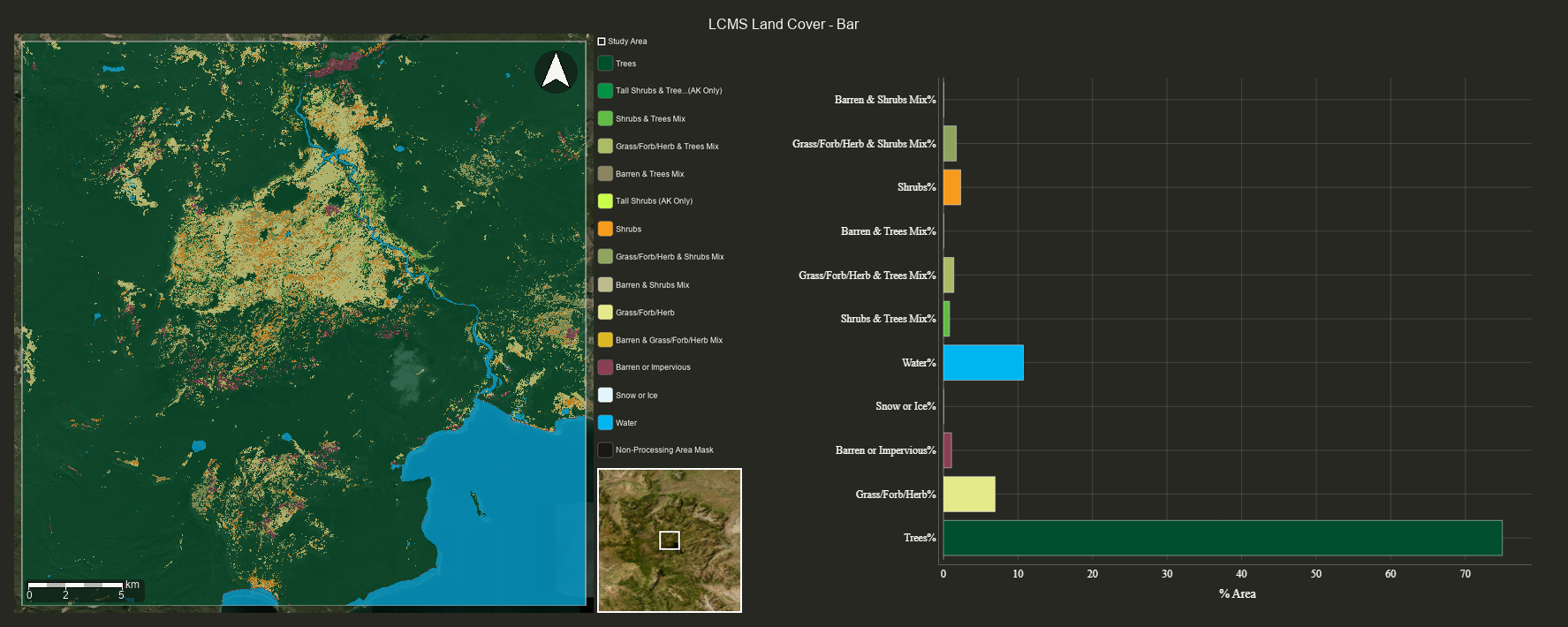
Map + Bar chart | Legend on thumb only, no chart legend
# 8b. Image + single geometry - donut chart
r = tl.generate_map_chart(
    lcms_single, study_area,
    basemap="esri-satellite",
    burn_in_geometry=True, geometry_outline_color="white",
    chart_type="donut",
    title="LCMS Land Cover - Donut",
    chart_scale=30,
    output_path=os.path.join(output_dir, "08b_map_chart_donut.png"),
)
display(Image(data=r["bytes"]))
print("Map + Donut chart")
# 8c. Image + multi-feature FC - stacked bar
r = tl.generate_map_chart(
    lcms_single, four_features,
    feature_label="name", columns=2,
    basemap="esri-satellite",
    burn_in_geometry=True, geometry_outline_color="white",
    chart_type="stacked_bar",
    title="LCMS by Feature - Stacked Bar",
    chart_scale=30,
    output_path=os.path.join(output_dir, "08c_map_chart_multi_bar.png"),
)
display(Image(data=r["bytes"]))
print("Multi-feature map grid + stacked bar chart")
[generate_map_chart] starting thumb thread (dimensions=640, basemap='esri-satellite') ...
[generate_map_chart] starting chart thread (chart_type='stacked_bar', chart_scale=30m, area_format='Percentage') ...
[generate_map_chart] chart thread done
[generate_map_chart] thumb thread done
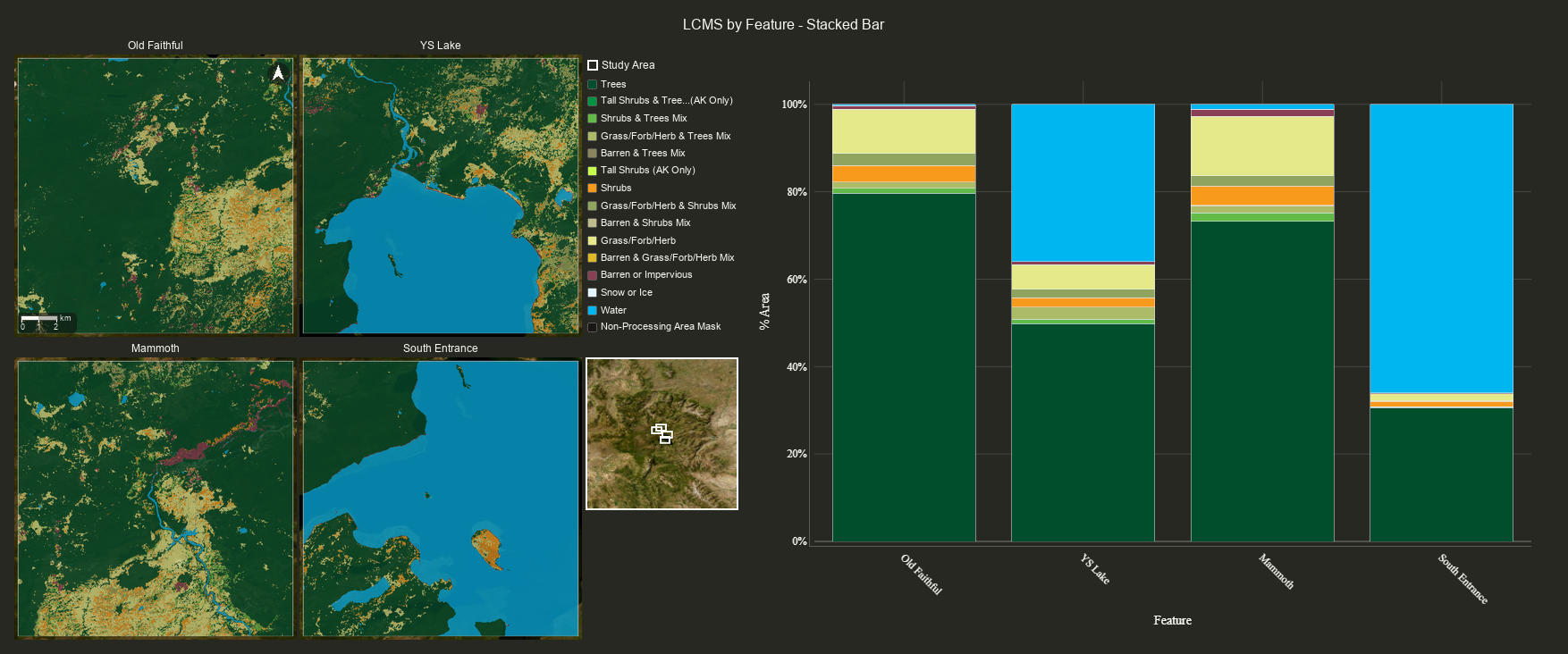
Multi-feature map grid + stacked bar chart
# 8d. Scatter — S2 swir2 vs nir colored by LCMS Land Cover
s2_lc = ee.Image(s2_single.select(["swir2", "nir"]).addBands(
    lcms_single
).copyProperties(lcms_single)).setDefaultProjection(crs_albers)

scatter_pts = ee.FeatureCollection.randomPoints(study_area, 500, seed=42)

r = tl.generate_map_chart(
    s2_lc, scatter_pts,
    chart_type="scatter",
    band_names=["swir2", "nir"],
    thematic_band_name="Land_Cover",
    basemap="esri-satellite",
    geometry_outline_color="black",
    title="Scatter: SWIR2 vs NIR by Land Cover",
    chart_scale=30,
    opacity=0.5,
    output_path=os.path.join(output_dir, "08d_map_chart_scatter.png"),
)
display(Image(data=r["bytes"]))
print("Map (with sample points) + scatter plot colored by Land Cover class")
[generate_map_chart] starting thumb thread (dimensions=640, basemap='esri-satellite') ...
[generate_map_chart] starting chart thread (chart_type='scatter', chart_scale=30m, area_format='Percentage') ...
Converting features 1-500
[generate_map_chart] chart thread done
[generate_map_chart] thumb thread done
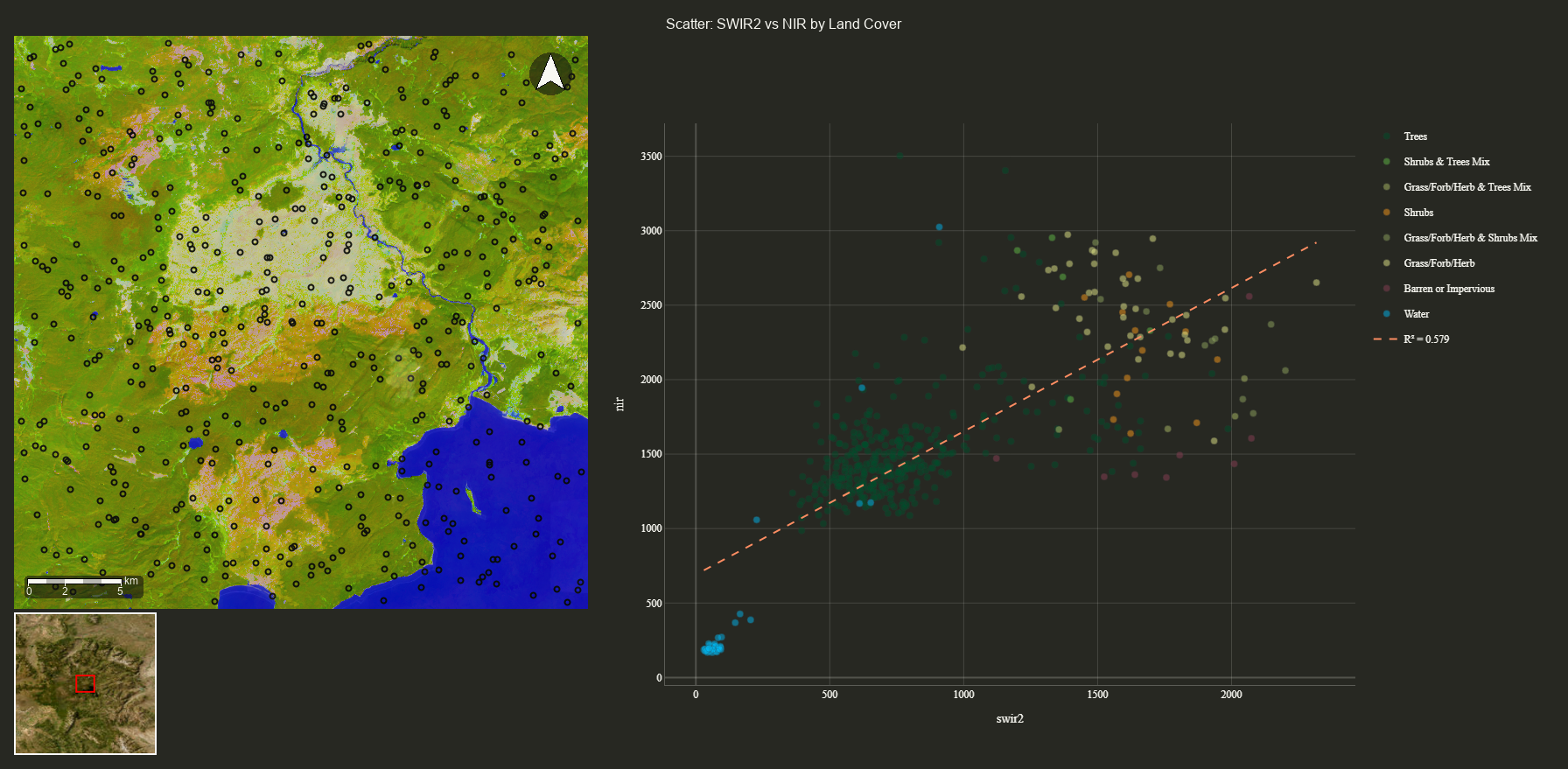
Map (with sample points) + scatter plot colored by Land Cover class
# 8e. ImageCollection auto-delegates to GIF
r = tl.generate_map_chart(
    lcms_ic, study_area,
    basemap="esri-satellite",
    burn_in_geometry=True, geometry_outline_color="white",
    title="LCMS Time Series (auto GIF)",
    chart_scale=30,
    output_path=os.path.join(output_dir, "08e_map_chart_auto_gif.gif"),
)
# Returns bytes since it detected ImageCollection
display(Image(data=r["bytes"]))
print("ImageCollection auto-delegated to generate_map_chart_gif()")
# 8f. Stacked layout (map above chart)
r = tl.generate_map_chart(
    lcms_single, study_area,
    basemap="esri-satellite",
    burn_in_geometry=True, geometry_outline_color="white",
    chart_type="donut",
    title="Stacked Layout",
    layout="stacked",
    chart_scale=30,
    output_path=os.path.join(output_dir, "08f_map_chart_stacked.png"),
)
display(Image(data=r["bytes"]))
print("Stacked layout (map above, chart below)")
9. Theme & Font Options
# 9a. Light theme
r = tl.generate_thumbs(
    lcms_single, study_area,
    bg_color="#d6d1ca",
    basemap="esri-topo", burn_in_legend=True,
    scalebar=True, north_arrow=True,
    output_path=os.path.join(output_dir, "09a_light_theme.png"),
)
display(Image(data=r["bytes"]))
print("Light theme (bg_color='#d6d1ca')")
# 9b. Large fonts
r = tl.generate_thumbs(
    lcms_single, study_area,
    basemap="esri-satellite",
    burn_in_legend=True, scalebar=True, north_arrow=True,
    title_font_size=24, label_font_size=16,
    burn_in_geometry=True, geometry_outline_color="white",
    output_path=os.path.join(output_dir, "09b_large_fonts.png"),
)
display(Image(data=r["bytes"]))
print("Large fonts (title=24, label=16)")
# 9c. Small fonts
r = tl.generate_thumbs(
    lcms_single, study_area,
    basemap="esri-satellite",
    burn_in_legend=True, scalebar=True, north_arrow=True,
    title_font_size=12, label_font_size=8,
    burn_in_geometry=True, geometry_outline_color="white",
    output_path=os.path.join(output_dir, "09c_small_fonts.png"),
)
display(Image(data=r["bytes"]))
print("Small fonts (title=12, label=8)")
# 9d-e. Legend scale options
for scale_val in [1.5, 0.6]:
    r = tl.generate_thumbs(
        lcms_single, study_area,
        basemap="esri-satellite",
        burn_in_legend=True, legend_scale=scale_val,
        scalebar=True, north_arrow=True,
        output_path=os.path.join(output_dir, f"09{'d' if scale_val > 1 else 'e'}_legend_scale_{str(scale_val).replace('.','_')}.png"),
    )
    display(Image(data=r["bytes"]))
    print(f"Legend scale = {scale_val}")
10. Basemap Presets
Available presets: esri-satellite, esri-topo, esri-street, esri-terrain, esri-natgeo, esri-hillshade, esri-hillshade-dark, esri-ocean, esri-dark-gray, esri-light-gray, usgs-topo, usgs-imagery-topo, usgs-shaded-relief, usgs-hydro, google-satellite, google-hybrid, osm
Underscores work too (e.g. esri_world_imagery resolves to esri-satellite).
basemaps_to_test = ["esri-satellite", "esri-topo", "esri-hillshade", "esri-dark-gray", "usgs-topo"]
for bm in basemaps_to_test:
    r = tl.generate_thumbs(
        None, study_area, basemap=bm,
        scalebar=True, north_arrow=True,
        burn_in_geometry=True, geometry_outline_color="red", geometry_fill_color="FF000022",
        output_path=os.path.join(output_dir, f"10_{bm.replace('-','_')}.png"),
    )
    display(Image(data=r["bytes"]))
    print(f"Basemap: {bm}")
Summary
Function |
Output |
Legend |
Basemap |
Inset |
Geometry |
CRS |
|---|---|---|---|---|---|---|
|
Single PNG or multi-feature grid |
Thematic + continuous |
Yes |
On-map or off-map |
burn_in, clip, outline/fill color |
Any EPSG |
|
Animated GIF |
Thematic + continuous |
Yes |
On all frames |
burn_in, clip, outline/fill color |
Any EPSG |
|
Grid PNG of dated frames |
Thematic + continuous |
Yes |
Beside legend (1 row) or at row 2 |
burn_in, clip, outline/fill color |
Any EPSG |
|
Map + chart PNG (Image) or GIF (IC) |
On thumb only (de-duped) |
Yes |
Yes |
burn_in, points for scatter |
Any EPSG |
|
Map + chart animated GIF |
Horizontal below |
Yes |
Yes |
burn_in, clip, outline/fill color |
Any EPSG |
Common Parameters
Parameter |
Description |
Default |
|---|---|---|
|
Preset name or ArcGIS MapServer URL |
|
|
Output projection EPSG code |
|
|
Paint study area boundary on frames |
|
|
Boundary line color (name or hex) |
auto-detected |
|
Boundary fill (hex with alpha, e.g. |
|
|
Mask data outside boundary |
|
|
Overview locator map |
|
|
Cartographic elements |
|
|
Legend panel |
|
|
Font sizing |
|
|
Background / theme ( |
|
|
Gamma correction for auto_viz continuous stretch |
|
Chart Types for generate_map_chart()
chart_type |
Input |
Description |
|---|---|---|
|
ee.Image |
Horizontal bar chart of class areas |
|
ee.Image |
Stacked bar (single or grouped by feature) |
|
ee.Image (thematic only) |
Donut chart, one per feature for multi-FC |
|
ee.Image + ee.FeatureCollection |
Scatter of 2 bands, optionally colored by thematic_band_name |
|
ee.ImageCollection |
Auto-delegates to generate_map_chart_gif() |