Earth Engine Authentication
geeViz talks to Google Earth Engine (GEE) as you — but “you” can mean
several different things depending on where the code runs: a laptop
with gcloud auth application-default login, a Cloud Run service
with an attached service account, a Colab notebook, a shared training
project, or a multi-tenant server that needs to switch between accounts
per request.
This page explains how geeViz’s authentication layer
(geeViz.eeAuth) resolves credentials, what your options are, when
you actually need to think about them, and how the whole thing stays
secure. (The right-hand On this page sidebar links to each section.)
TL;DR
For a plain ee.Initialize(project='my-project') on a laptop you
do not need to touch geeViz.eeAuth. The first call to
Map.view() (or any other geeViz function that talks to Earth
Engine) will auto-discover whatever credentials the environment already
provides, spin up a small local proxy, and route Earth Engine traffic
through it. You keep coding, geeViz handles auth.
You should read the rest of this page if any of these apply:
You want one Python process (script, notebook, or web server) to talk to EE as multiple accounts concurrently.
You’re deploying geeViz to Cloud Run / Cloud Functions / GKE and want to run keyless with an attached service account.
You need per-tenant / per-user billing attribution in GCP.
You need to explain the auth model to security reviewers or operators who ask “does this thing keep a JSON key on disk?”
Why geeViz has its own auth layer
The Earth Engine Python SDK stores credentials in
module-global state via ee.Initialize(). That’s fine for a
single-user script but breaks the moment you want:
A single web-server process serving requests for multiple GCP projects at once (each with its own service account).
Concurrent notebook cells that need to be attributed to different billing accounts.
A shared training project that many students hit — without handing each of them a JSON key.
geeViz.eeAuth sidesteps this by running a local
token-injecting HTTP proxy. The Earth Engine SDK is initialized
against the proxy URL (not against a fixed credential); the proxy
looks at each incoming request, picks the right service account for
that request, mints a fresh short-lived token, and forwards to
earthengine.googleapis.com. One Python process, one
ee.Initialize call, unlimited concurrent tenants.
For most users this is invisible. Read on only if you want to know how the sausage is made — or you need to configure something non-default.
How the map viewer talks to Earth Engine (frontend flow)
A common question when someone first opens Map.view(): “The map
is running in my browser — how is it authorized to talk to Earth
Engine without me shipping my service-account key to the browser?”
Short answer: it isn’t. No credential ever leaves the Python
process. Here’s the actual data flow:
┌───────────────┐                        ┌──────────────────────┐
│               │  1. GET map page       │  Local static server │
│               │◀─────────────────────▶ │  (127.0.0.1:PORT,    │
│               │                        │   loopback-only)     │
│               │                        │                      │
│               │                        │  ┌────────────────┐  │
│               │  2/3. Control-plane    │  │ /ee-api/*      │  │
│               │      REST (getMapId,   │  │ reverse-proxy  │  │
│               │      value:compute,    │  └────┬──▲────────┘  │
│               │      exports, ...)     │       │  │           │
│               │                        │       │  │ 6. reply  │
│               │                        │       │  │  travels  │
│  Your browser │  ── request ──────────▶│       │  │  back the │
│  (map viewer) │                        │       │  │  same     │
│               │                        │       │  │  path     │
│               │◀── response ── ── ── ──│◀── ── ┘  │           │
│               │                        │          │           │
│               │                        │  ┌────▼──┴────────┐  │
│               │                        │  │ eeAuth proxy   │  │
│               │                        │  │                │  │
│               │                        │  │ • pick SA by   │  │
│               │                        │  │   /t/<tenant>  │  │
│               │                        │  │ • mint token   │  │
│               │                        │  │ • stamp        │  │
│               │                        │  │   workloadTag  │  │
│               │                        │  └────┬──▲────────┘  │
│               │                        └───────┼──┼───────────┘
│               │                                │  │
│               │                       4. HTTPS │  │ 5. JSON reply
│               │                          + SA  │  │    (map IDs,
│               │                          bearer│  │    signed tile
│               │                                │  │    URLs, etc.)
│               │                                ▼  │
│               │                        ┌──────────┴───────────────┐
│               │                        │ earthengine.googleapis   │
│               │                        │ .com  (Google servers)   │
│               │                        │                          │
│               │  7. GET tile bytes     │       ┌──────────────┐   │
│               │─────────────────────── │──────▶│ tile CDN     │   │
│               │◀────────────────────── │───────│ (signed URL, │   │
│               │  8. tile PNG           │       │  no auth     │   │
│               │     (never touches     │       │  header)     │   │
│               │      the proxy)        │       └──────────────┘   │
│               │                        └──────────────────────────┘
└───────────────┘
The control-plane REST (steps 2–6) is symmetric — the browser’s
request goes through the reverse-proxy → eeAuth proxy → Google, and
Google’s response comes back through eeAuth proxy → reverse-proxy →
browser. The proxy sees every byte of every getMapId /
value:compute / export response and can log, rewrite, or audit it
if it wants to.
The tile data plane (steps 7–8) is asymmetric and skips the proxy
entirely: when a getMapId response returns, it contains
pre-signed tile URLs that Google has already authorized for direct
fetch. The browser hits Google’s tile CDN with no bearer token and no
proxy hop — that keeps tile latency low and takes the proxy out of
the throughput path (a busy map might fetch hundreds of tiles per
minute; you don’t want them all round-tripping through a Python
process).
Step-by-step:
``Map.view()`` starts a small local HTTP server on 127.0.0.1 that serves the geeView bundle (HTML / JS / CSS). Same origin as the map page — no CORS concerns.
The browser initializes the Earth Engine JS SDK against a same-origin URL:
ee.initialize("/ee-api", ...)plus an anonymous placeholder token. The browser never sees a real Google OAuth token.Every REST call the JS SDK makes (
getMapId,computePixels,value:compute, etc.) goes tohttp://127.0.0.1:PORT/ee-api/t/<tenant>/v1/…— same origin as the page.The static server reverse-proxies ``/ee-api/*`` to the local eeAuth proxy running in the same Python process (or bound to a separate loopback port; either way it’s local-only). No external network hop.
The eeAuth proxy takes over. It reads the tenant from the
/t/<tenant>/path prefix, looks up the matching credential, mints a fresh short-lived Google OAuth token (from a service account key, ADC, an attached-SA metadata server, or IAM impersonation — see the sections below), stamps aworkloadTagfor billing attribution, and forwards tohttps://earthengine.googleapis.comover HTTPS. Google’s response flows back through the same chain — proxy → reverse-proxy → browser — so the proxy can log or audit every control-plane reply if it needs to.Tile URLs skip the proxy entirely. When
getMapIdreturns, Earth Engine hands back tile URLs already signed for direct fetch. The browser fetches tiles straight from Google’s tile servers — the proxy sits in the control plane (map IDs, computations, exports), not the data plane (tile bytes). That keeps tile latency low and takes the proxy out of the throughput path.
Why this is secure by construction:
In proxy mode, the browser never receives a Google OAuth token.
urlParams.accessTokenis the literal string"None"; the JS SDK is pointed at the local proxy, and no bearer header appears on outbound EE calls from the tab. Nothing you’d want to steal shows up in DevTools, local storage, or a screenshot. (Direct-token mode, used only by the standalone-HTML export path in the MCP server, deliberately injects a short-lived token per response — the trust model there is “the token is scoped to this one HTML export and expires in ~1 hour.” See “Inside the page” above.)The proxy binds to loopback (``127.0.0.1``). External callers can’t reach it. On multi-user machines, only processes running as the same OS user can talk to it.
Credentials live in the Python process. They enter via ADC, the metadata server, or an env var, and they never round-trip through the browser or the wire.
Each browser tab is pinned to one tenant. The
/ee-api/t/<tenant>/prefix is baked into the JS at page-load time — subsequenteeCreds.use()switches in Python can’t cause an open tab to drift to a different credential. Multi-tenant concurrency is per-request, not per-tab.
The same flow works in Colab and Vertex AI Workbench: geeViz
detects those environments and uses their notebook-proxy URL
(google.colab.kernel.proxyPort() or Workbench’s
notebooks.googleusercontent.com proxy) as the same-origin base
instead of 127.0.0.1. The trust model is unchanged — the notebook
proxy sits between the browser and your kernel process, no
credentials leave the kernel.
And it’s the same flow when the proxy is mounted inside a Cloud
Run service (as in the geeViz Agent). There the “browser → same-
origin static server → local eeAuth proxy” chain just happens to run
inside a Cloud Run container, and the FastAPI app’s auth middleware
(IAP, marketplace JWT, session cookie) gates who can hit
/ee-api/* in the first place.
Inside the page: what ee.initialize() actually does
Zooming in on step 2 of the flow above: how does the JavaScript running in the browser tab actually get pointed at your Python process’s proxy? The chain is short and mechanical — no cookies, no localStorage, no OAuth dance in the browser. It’s four moving parts:
1. Python builds a URL and Python’s ``webbrowser.open()`` hands it to the browser. There are two flavors — pick your poison:
# Proxy mode (default): only a cache-buster in the query string.
http://127.0.0.1:8889/geeView/?v=1784217600123

# Legacy direct-token mode (older path, still supported): token
# + project baked into the query string.
http://localhost:8001/geeView/?projectID=my-project&accessToken=ya29.abc…&accessTokenCreationTime=1784217600123
Tenant routing in proxy mode is NOT via query string — it’s baked
into the per-session runGeeViz.js the tab fetches after the page
loads. Map.view() prepends this small JavaScript at the top of the
generated runGeeViz.js (see geeView.py:_build_run_js, ~line
1655):
// Runs BEFORE ee.initialize() fires, and reassigns the top-level
// authProxyAPIURL variable that lcms-viewer.min.js had defaulted
// to window.location.origin + "/ee-api". Once reassigned, every
// REST call the JS SDK issues carries the /t/<tenant>/ path prefix.
try {
  authProxyAPIURL = window.location.origin + '/ee-api/t/<tenant>';
} catch (e) {}
The <tenant> value is URL-encoded via urllib.parse.quote and is
whatever eeCreds.use() had selected at the moment Map.view()
was called. Because the snippet is baked into each per-session
runGeeViz.js, every open browser tab is permanently pinned to its
tenant — later eeCreds.use("other") calls in Python only affect
new Map.view() calls, not existing tabs.
(For the standalone-HTML export path — map_control(action="export")
in the MCP server, chat-embedded maps — Python does inline a
<script> at the top of the exported HTML that sets
urlParams.accessToken, urlParams.projectID,
urlParams.geeAuthProxyURL etc. from placeholders. Same JS below
consumes it. But for a plain Map.view() in a notebook or script,
those values come from the query string plus the runGeeViz.js
snippet — never from an inline script in the served HTML.)
2. The viewer’s bootstrap picks proxy mode vs direct-token mode.
lcms-viewer.min.js parses the query string into urlParams and
inspects what it got:
// Default: same-origin /ee-api when nothing was set by the URL
// (Map.view() plain proxy mode) OR by the inline script (export mode).
if (!urlParams.geeAuthProxyURL) {
  urlParams.geeAuthProxyURL = window.location.origin + "/ee-api";
}
let authProxyAPIURL = urlParams.geeAuthProxyURL;
let geeAPIURL       = "https://earthengine.googleapis.com";

// Direct-token mode kicks in ONLY if a real bearer landed in urlParams
// (query string in legacy Map.view(), inline script in export mode).
if (urlParams.accessToken &&
    urlParams.accessToken !== "None" &&
    urlParams.accessToken !== "null") {
  authProxyAPIURL = null;
  geeAPIURL       = null;                        // fall back to default
  ee.data.setAuthToken("", "Bearer",
                       urlParams.accessToken, 3600, [], undefined, false);
}
So there are actually two client-side auth pathways, and Python
picks between them by choosing what to put in urlParams.accessToken:
accessToken = "None"(or missing) → proxy mode. The tab talks toauthProxyAPIURLfor every REST call. No bearer token ever enters the browser. This is the default forMap.view()today.accessToken = <real Google OAuth token>→ direct-token mode. The tab talks straight toearthengine.googleapis.comwith that token in anAuthorization: Bearerheader. Used by the legacy standalone-HTML export path (map_control(action="export")in the MCP server, chat-embedded maps) where the agent injects a freshly-minted short-lived token per request.
3. ``ee.initialize()`` is called with those two URLs plus the project ID. The signature the EE JS SDK exposes is:
ee.initialize(
  apiUrl,           // authProxyAPIURL — every REST call goes here
  tileUrl,          // geeAPIURL — tile fetch base
  onSuccess, onFailure,
  xsrfToken,        // null in geeViz's case
  project           // urlParams.projectID — stamped on x-goog-user-project
);
In proxy mode both URL args are non-null, and the SDK just forwards
its normal call shape to the proxy. In direct-token mode both are
null and the SDK uses its built-in EE defaults. Same JS, same
Map.addLayer code — the only thing that differs is where the
bytes go on the wire.
4. Every downstream ``getMapId`` / ``value:compute`` call inherits
the same target. Once ee.initialize returns, the SDK caches
authProxyAPIURL and uses it for every subsequent request. The
tenant path prefix is baked into that URL, so nothing at the JS layer
has to know about tenants — it just posts to /ee-api/t/<tenant>/v1/…
and the proxy on the Python side does the mapping.
Watching it happen. Open a Map.view() in a browser tab, open
DevTools → Network, and filter on ee-api. You’ll see the JS SDK
issuing POSTs like:
POST http://127.0.0.1:8889/ee-api/t/default/v1/projects/earthengine-legacy/maps:getMap
Request headers:
  (no Authorization header — the proxy adds it before forwarding)
Response:
  { "name": "projects/.../maps/<map-id>",
    "tileFetcher": { "urlFormat": "https://earthengine.googleapis.com/.../tiles/{z}/{x}/{y}" } }
Then the tile requests go straight to earthengine.googleapis.com
using the urlFormat that came back — those don’t hit the proxy at
all, matching step 7–8 of the diagram above.
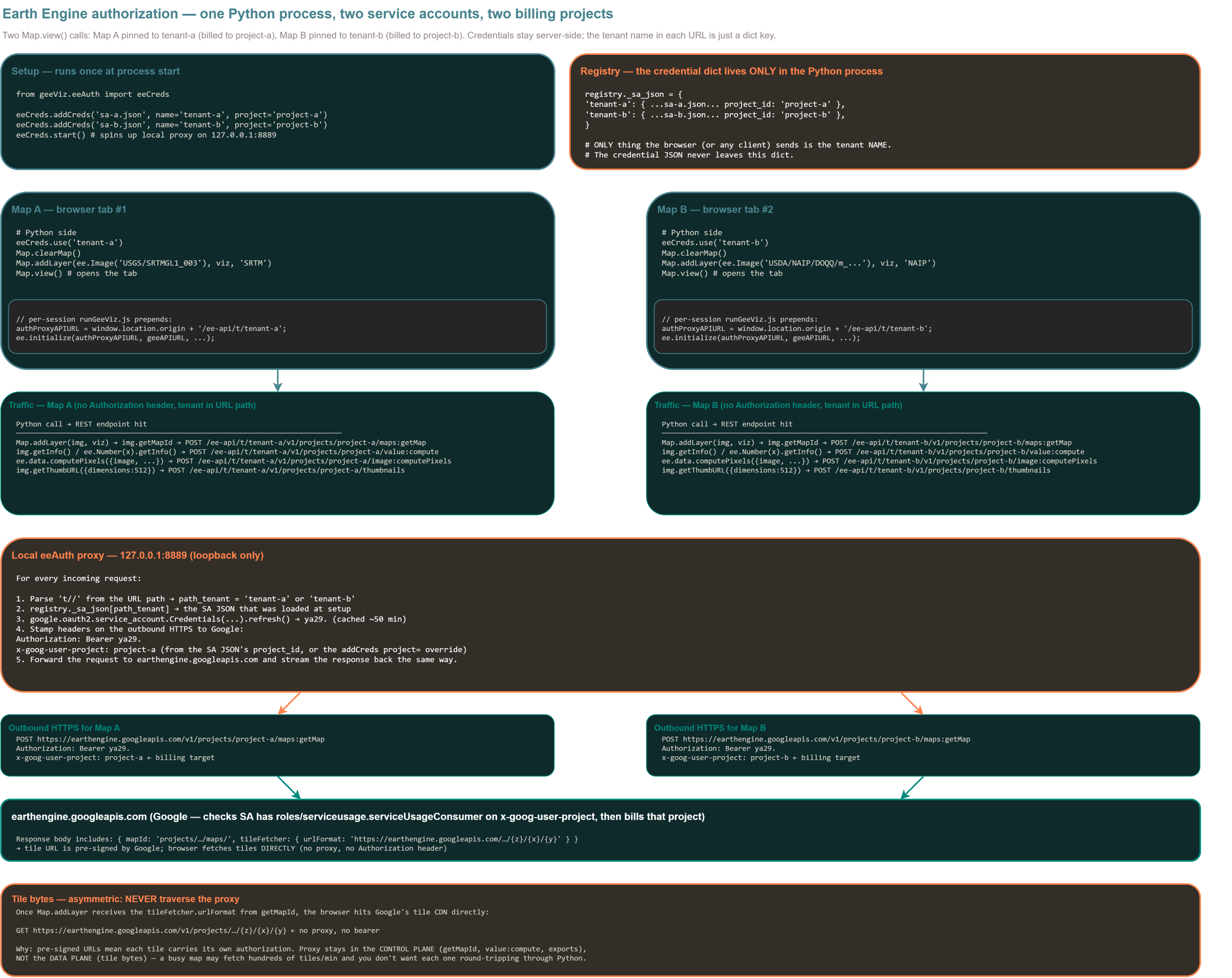
Worked example: two maps, two tenants, two billing projects
Let’s put a face on all of the above. Two service accounts, each
registered with Earth Engine on a different GCP project. One Python
process opens two Map.view() tabs — one for each — and every EE
call from each tab is billed to the matching project. Nothing extra
gets set up per-request; the entire wiring happens once at start.
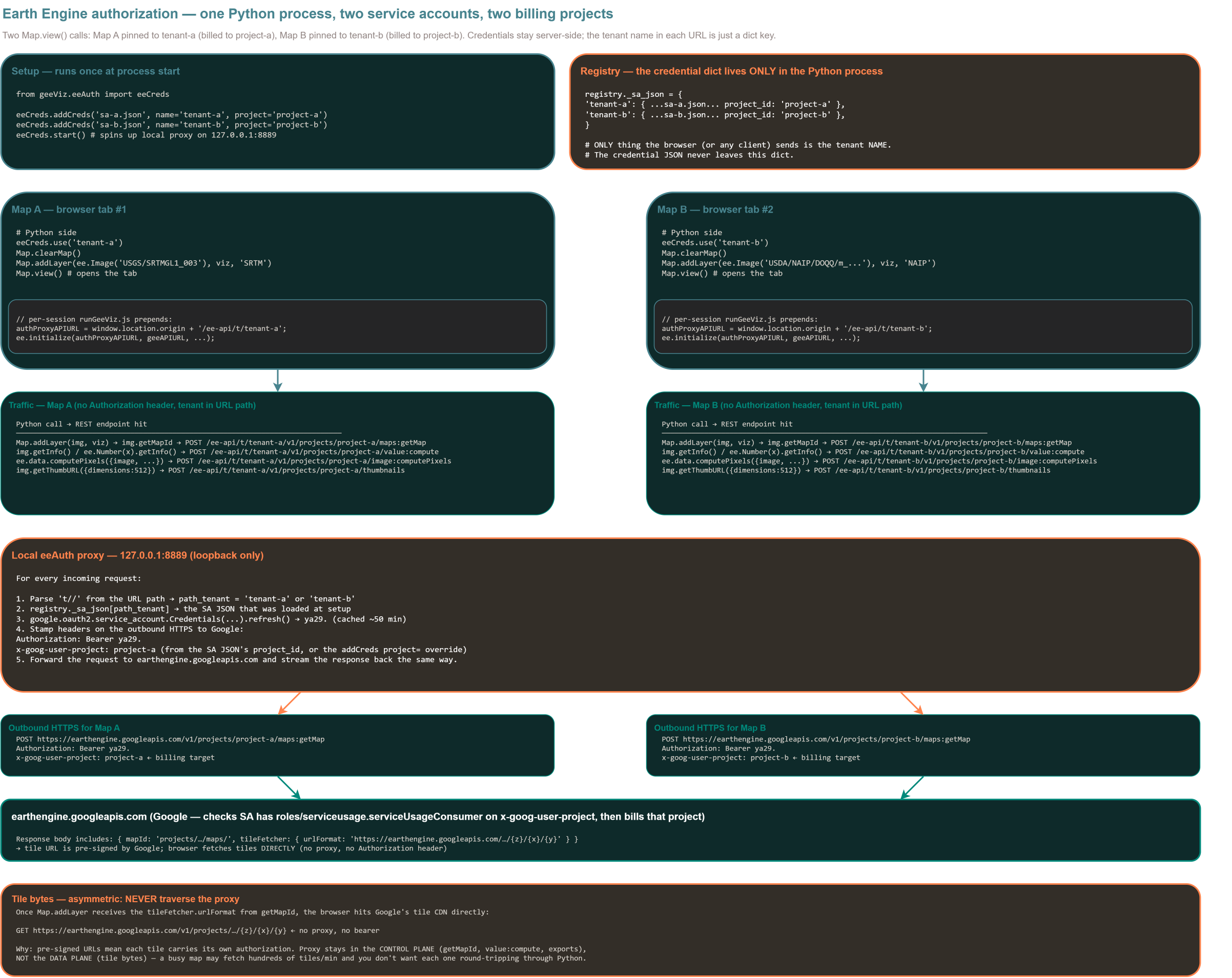
The diagram above is interactive — click and drag to pan, scroll or
use the toolbar to zoom in on any panel (the traffic captures at the
top and the proxy algorithm in the middle become fully legible when
you zoom in). Prefer a static image? Download the
full-resolution PNG (2404×1909),
or view the same diagram as a standalone HTML file in a new tab.
Setup (once):
from geeViz.eeAuth import eeCreds

eeCreds.addCreds("sa-a.json", name="tenant-a", project="project-a")
eeCreds.addCreds("sa-b.json", name="tenant-b", project="project-b")
eeCreds.start()      # spins up local proxy on 127.0.0.1:8889
After this, the proxy’s registry is a plain Python dict:
registry._sa_json = {
    "tenant-a": { ...sa-a.json..., "project_id": "project-a" },
    "tenant-b": { ...sa-b.json..., "project_id": "project-b" },
}
Open Map A (bills project-a):
from geeViz.geeView import Map
import ee

eeCreds.use("tenant-a")
Map.clearMap()
Map.addLayer(ee.Image("USGS/SRTMGL1_003"),
             {"min": 0, "max": 4000, "palette": "green,yellow,white"},
             "SRTM")
Map.view()
The tab that opens fetches a per-session runGeeViz.js whose first
line is:
authProxyAPIURL = window.location.origin + "/ee-api/t/tenant-a";
Open Map B (bills project-b) in a second tab, same process:
eeCreds.use("tenant-b")
Map.clearMap()
Map.addLayer(ee.Image("USDA/NAIP/DOQQ/m_..."),
             {"bands": ["R", "G", "B"], "min": 0, "max": 255},
             "NAIP")
Map.view()
Tab #2’s runGeeViz.js prepends:
authProxyAPIURL = window.location.origin + "/ee-api/t/tenant-b";
Traffic capture — the actual bytes on the wire.
Every REST call each tab makes carries its tenant in the URL path. The tabs’ outbound requests look like:
# Map A — every getMapId, value:compute, image:computePixels
POST http://127.0.0.1:8889/ee-api/t/tenant-a/v1/projects/project-a/maps:getMap
POST http://127.0.0.1:8889/ee-api/t/tenant-a/v1/projects/project-a/value:compute
POST http://127.0.0.1:8889/ee-api/t/tenant-a/v1/projects/project-a/image:computePixels

Request headers (from the browser tab):
  (no Authorization header — anonymous EE client)
  Content-Type: application/json

# Map B — same shape, different tenant + different EE project
POST http://127.0.0.1:8889/ee-api/t/tenant-b/v1/projects/project-b/maps:getMap
POST http://127.0.0.1:8889/ee-api/t/tenant-b/v1/projects/project-b/value:compute
POST http://127.0.0.1:8889/ee-api/t/tenant-b/v1/projects/project-b/image:computePixels
The proxy takes each request, parses the tenant name out of the
/t/<name>/ path segment, looks up the SA JSON in registry._sa_json,
mints (or returns a cached) OAuth token, and forwards to Google:
# Map A's request as it leaves the proxy toward earthengine.googleapis.com
POST https://earthengine.googleapis.com/v1/projects/project-a/maps:getMap
Authorization:       Bearer ya29.a0AS3H6NxTOKEN-A…
x-goog-user-project: project-a            ← billing target
Content-Type:        application/json

# Map B's request
POST https://earthengine.googleapis.com/v1/projects/project-b/maps:getMap
Authorization:       Bearer ya29.a0AS3H6NxTOKEN-B…
x-goog-user-project: project-b            ← billing target
Google’s response for getMapId comes back with a pre-signed
tile URL:
{
  "name": "projects/project-a/maps/xxxxx…",
  "tileFetcher": {
    "urlFormat": "https://earthengine.googleapis.com/v1/…/{z}/{x}/{y}"
  }
}
That signed URL is what the browser fetches tiles from — directly, bypassing the proxy:
# Tile bytes — go straight from browser to Google's tile CDN
GET https://earthengine.googleapis.com/v1/projects/project-a/maps/xxxxx/tiles/10/163/395
  (no Authorization header — URL carries its own signature)

GET https://earthengine.googleapis.com/v1/projects/project-b/maps/yyyyy/tiles/10/163/395
  (no Authorization header — URL carries its own signature)
What’s landing where at the end of it all:
Every
getMapId,value:compute,image:computePixelsfrom tab A → billed toproject-a.Same calls from tab B → billed to
project-b.Tile bytes for either tab → served from Google’s CDN directly, no proxy hop, still attributed to the map ID’s project (i.e. the SA had authority when
getMapIdran).The two tabs are permanently pinned — a later
eeCreds.use("some-other")in Python won’t change what either tab does; it only changes what a newMap.view()call would use.
The one thing the client ever sends is a tenant NAME — an opaque
identifier like "tenant-a". The credential material (the SA
JSON, the minted OAuth token) lives entirely in the Python process’s
memory. Even if you dumped the network trace between the browser and
the proxy, you’d see no SA keys and no bearer tokens — just tenant
names in URL paths and JSON bodies with EE algorithm calls.
How geeViz picks credentials
On the first Earth-Engine-touching call, geeViz runs
geeViz.eeAuth.eeCreds.EECreds.discover(), which checks these
sources in order and registers whichever ones it finds. Each registered
source becomes a named credential entry you can switch between later.
Source |
Registered as |
Typical setup |
|---|---|---|
|
|
Standard GCP env var; points at a service-account key file. |
|
|
Created by |
gcloud ADC well-known file |
|
Created by |
|
|
Legacy single-SA env-var pattern, still supported. |
|
|
Multi-tenant deployment — one env var per SA, no files on disk. |
|
|
Impersonate an SA using the runtime identity’s own credentials (no key material at all). |
|
|
Fires only when nothing else registered. Covers GCP attached SAs (Cloud Run, GKE, GCE — tokens from the metadata server) AND Workload Identity Federation on AWS / Azure / on-prem (tokens minted by exchanging a native cloud / OIDC identity). No key on disk, no env var to leak in either case. |
If the environment provides several sources, all of them get
registered — you can switch between them at runtime with
eeCreds.use(name) without re-initializing anything.
If nothing is discovered, geeViz falls back to the classic direct
ee.Initialize() path. You’ll get whatever ee.Initialize()
would have picked up on its own; the proxy simply doesn’t start.
Choosing an auth method
Application Default Credentials (ADC) — recommended for local dev
$ gcloud auth application-default login
$ gcloud config set project my-gcp-project
How it works. ADC stashes an OAuth refresh token in a well-known
file under your home directory. Every GCP client library — including
Earth Engine — looks for that file automatically when no other
credential source is set. geeViz’s discovery picks it up as the
"adc-default" entry.
Pros
No JSON keys anywhere on disk. The token is scoped to your Google identity and expires on its own schedule.
The same login works for every Google Cloud tool (
gcloud,bq,gsutil, Python client libraries, Earth Engine).Rotating is trivial:
gcloud auth application-default revoke, then re-login.
Cons
Tied to a user identity. Not appropriate for shared / production workloads — those need a service account or workload identity.
The refresh token has broad scope by default; treat the ADC file like a password.
Use for. Personal laptops, Colab, VS Code, Cursor, any interactive notebook workflow.
User OAuth via earthengine authenticate
$ earthengine authenticate
$ earthengine set_project my-gcp-project
How it works. Prompts you through Google’s OAuth consent flow,
saves a refresh token to ~/.config/earthengine/credentials. geeViz
picks it up as the "ee-persistent" entry. This is the
Earth-Engine-specific counterpart to ADC — it works even on machines
that don’t have gcloud installed.
Pros
Doesn’t require
gcloudon the machine.The token is scoped to Earth Engine (narrower blast radius than a full ADC token).
Cons
Doesn’t help other Google Cloud SDKs — you still need ADC or a key for BigQuery, GCS, etc.
User-tied; same caveats as ADC for shared / production workloads.
Use for. Machines without gcloud (older CI runners, minimal
container images) where you only need Earth Engine.
Attached service account (Cloud Run / GKE / GCE) — recommended for prod
# When deploying, attach a service account to the runtime.
gcloud run deploy my-service \
  --service-account=[email protected] \
  ...
How it works. No JSON key is deployed with the code. The runtime
(Cloud Run, GKE, GCE) exposes a metadata server at
169.254.169.254. Google’s client libraries — including
google.auth.default() — request short-lived tokens from that server
whenever they need one. The tokens are:
Ephemeral. ~1 hour lifetime; automatically refreshed on demand.
Scoped. Mint only the scopes your code asks for, not the SA’s full power.
Never on disk. Never in an env var. Never in a Docker layer.
geeViz’s discovery falls back to google.auth.default() when it
finds nothing else, and registers the resulting credentials as
"adc". From geeViz’s perspective, an attached-SA Cloud Run deploy
looks like “a nameless ADC credential is available” — everything else
works the same as with a local ADC file.
Pros
Keyless. No JSON key exists to be leaked, checked into git, copy-pasted, or exfiltrated by a compromised process.
Rotation is Google’s problem. No cron job, no secret manager rotation, no downtime.
Auditable. GCP Audit Logs show every token mint request against the attached SA — you can see exactly what your service does.
Cons
Only works inside a Google-managed runtime that exposes the metadata server. Locally, you’ll need ADC or a JSON key.
Requires the SA to be independently registered with Earth Engine at https://code.earthengine.google.com/register.
Use for. Every production Cloud Run / GKE / Cloud Functions / Vertex AI Workbench deployment. This is the model the geeViz Agent uses.
Base64 SA env var ($GEE_SERVICE_ACCOUNT_B64)
$ export GEE_SERVICE_ACCOUNT_B64="$(base64 -w0 sa-key.json)"
How it works. The SA JSON is base64-encoded and set as an
environment variable. geeViz picks it up as the "env-default"
entry. Multi-tenant variant: set GEE_<NAME>_SERVICE_ACCOUNT for
each tenant (e.g. GEE_TRAINING_SERVICE_ACCOUNT); each becomes a
switchable named credential.
Pros
Works anywhere env vars work — Docker, CI, systemd, etc.
No key file on disk (the env var is the storage medium).
Supports multi-tenant per-request switching in a single process.
Cons
The key still exists as material you can leak. Env vars leak into process listings, error reports, and crash dumps in ways that metadata-server tokens do not.
You own the rotation cadence.
Use for. Deployments where an attached SA isn’t possible but you still need multi-tenant switching (e.g. self-hosted Docker, non-Google-runtime clusters).
Impersonation ($GEE_<NAME>_SA_EMAIL)
$ export GEE_TRAINING_SA_EMAIL="[email protected]"
How it works. No key material is deployed. The runtime’s own
identity (ADC or an attached SA) uses the IAM
roles/iam.serviceAccountTokenCreator role to impersonate the
target SA and mint short-lived tokens on its behalf. The impersonated
SA can live in a completely separate GCP project.
Pros
Zero key material — combines the ergonomics of a named SA with the security posture of an attached SA.
Ideal for cross-project setups (e.g. an agent in project A that needs to run EE work billed to project B).
Impersonation is fully auditable in IAM logs.
Cons
Requires an IAM grant on the target SA (
roles/iam.serviceAccountTokenCreator), which someone with project-level IAM has to set up.The runtime identity must itself be authenticated (ADC / attached SA) — impersonation is not a bootstrap mechanism.
Use for. Shared training projects, cross-project agents, anywhere you want named tenants without ever handling a JSON key.
Non-Google runtimes (AWS, Azure, on-prem, CI)
Everything above assumes you’re running on GCP (Cloud Run, GKE, GCE)
or a laptop. When the runtime is AWS EC2 / EKS / Lambda, Azure VM /
AKS / Container App, an on-prem Kubernetes cluster, or a CI runner,
the attached-SA metadata-server path doesn’t exist — there’s no
169.254.169.254 Google metadata endpoint outside GCP.
You still have three good options; the first is strongly preferred.
Best: Workload Identity Federation (WIF) — the cross-cloud equivalent of an attached service account.
# AWS example — the file at $GOOGLE_APPLICATION_CREDENTIALS is a
# small credential-config JSON, NOT a service-account key. It only
# names the pool, provider, and target SA — no secret material.
$ export GOOGLE_APPLICATION_CREDENTIALS=/etc/gcp/aws-wif-config.json
How it works. You configure a Workload Identity Pool + Provider
in GCP that trusts specific identities in your other cloud (an AWS
IAM role, an Azure managed identity, an OIDC-compliant IdP like
Okta / Auth0 / Keycloak / GitHub Actions). You create a Google
service account, grant it roles/iam.workloadIdentityUser for the
pool, and register the SA with Earth Engine. The runtime then holds a
small credential-config JSON (from gcloud iam workload-identity-
pools create-cred-config) which describes how the Google auth
library should exchange a native cloud token for a Google STS token
for an SA access token. google.auth.default() walks that chain
transparently — no keys, no long-lived secrets, tokens minted on
demand and expire in ~1 hour.
geeViz picks up the resulting credential as the "adc" discovery
entry, exactly like a GCP attached SA. The runtime code is
identical; only the GOOGLE_APPLICATION_CREDENTIALS file
contents differ.
Runtime |
Trust source |
Cred-config generator |
|---|---|---|
AWS EC2 / ECS / EKS / Lambda |
IAM role (SigV4 against the AWS metadata service) |
|
Azure VM / AKS / Container Apps / Functions |
Managed Identity or App Registration (IMDS token) |
|
GitHub Actions |
Job’s OIDC token (audience-scoped, one per job) |
|
On-prem / self-hosted / any OIDC IdP |
Provider that issues OIDC ID tokens (Okta, Auth0, Keycloak, …) |
|
Pros
Zero static Google credentials. The credential-config JSON is not a secret — it’s a pointer, and stealing it doesn’t grant access without also compromising the underlying AWS role / Azure managed identity / OIDC IdP that it federates from.
Tokens are short-lived and minted per request; rotation is Google’s problem.
Fully auditable — both the source-cloud IAM logs and Google’s Cloud Audit Logs record the exchange.
Cons
Setup is a one-time-per-workload IAM ceremony (pool, provider, SA binding, EE registration). Google’s WIF setup guide is the canonical source.
The AWS/Azure identity the pool trusts must actually be attached to your workload — a Lambda without an execution role or an Azure Function without a managed identity has nothing to federate from.
Use for. Every production workload running outside GCP. This is what you’d deploy for a customer running EE work from EKS, from Databricks-on-AWS, from an Azure Data Factory pipeline, etc.
Second choice: SA JSON key delivered by a secret manager.
# Materialize the key at boot from AWS Secrets Manager / Azure Key
# Vault / on-prem Vault, then point ADC at it.
$ aws secretsmanager get-secret-value --secret-id gee-sa-key \
    | jq -r .SecretString > /tmp/sa.json
$ export GOOGLE_APPLICATION_CREDENTIALS=/tmp/sa.json
How it works. Standard SA JSON key, but you never bake it into the image or check it into git. The cloud-native secret store holds the actual JSON; each pod / VM / function pulls it at startup and writes to a tmpfs mount. Rotation is a matter of updating the secret value and restarting.
Pros
Works anywhere a shell and outbound HTTPS work. No WIF setup.
Familiar model for teams already using Secrets Manager / Key Vault / Vault for other cross-cloud credentials.
Cons
Real long-lived credential material lives at rest in your secret store (and briefly on disk on each host). Rotation is your job.
Access logs live in your secret manager, not GCP — auditing “did Google see us mint a token” requires stitching logs from both clouds.
Use for. Deployments where WIF setup is genuinely infeasible (a platform team you can’t get IAM changes through, an air-gapped environment where the OIDC exchange can’t reach Google) or as a transitional bridge while a WIF migration is in flight.
Third choice: impersonation from a WIF-authenticated base. The
Python process authenticates via WIF (as above), then
$GEE_<NAME>_SA_EMAIL names a different SA to impersonate for the
EE work. Zero static keys AND named per-tenant switching — the
strongest posture available on AWS/Azure.
Never do this on a server: gcloud auth application-default
login. That flow issues a user OAuth refresh token that impersonates
your human account. Fine on your laptop; wrong for anything that
runs unattended.
Multi-tenant / multi-credential workflows
Once more than one credential is registered, you can pick which one Earth Engine calls should use:
from geeViz.eeAuth import eeCreds
import ee
eeCreds.addCreds("/path/to/sa-prod.json", name="prod")
eeCreds.addCreds("/path/to/sa-training.json", name="training")
eeCreds.start() # local proxy comes up
eeCreds.use("prod")
ee.Number(1).getInfo() # routes through prod SA
with eeCreds.use("training"): # scoped switch — auto-reverts
ee.Number(2).getInfo() # routes through training SA
# back to "prod" here
The context-manager form uses a Python ContextVar, so concurrent
asyncio tasks in the same process each see their own tenant — a
cell using training will not affect a coroutine already running
under prod. Every browser tab that Map.view() opens is
pinned to the tenant that was current at the moment of the call
(via a /ee-api/t/<tenant>/ URL prefix), so subsequent Python-side
use() switches never drift open tabs to a different credential.
See the module-level docstring for the full
geeViz.eeAuth.eeCreds.EECreds API.
Running the proxy standalone
For server deployments (Cloud Run, Docker, on-prem) you can run the
proxy as its own process instead of letting Map.view() spawn it:
$ python -m geeViz.eeAuth --port 8888
Or mount it into an existing FastAPI app so it shares your existing auth middleware, logging, and TLS termination:
from fastapi import FastAPI
from geeViz.eeAuth import eeCreds
from geeViz.eeAuth.server import build_proxy_router
eeCreds.discover() # pick up whatever's in env
app = FastAPI()
app.include_router(build_proxy_router(creds=eeCreds), prefix="/ee-api")
The proxy resolves the tenant for each request from, in priority order:
X-geeViz-Credsrequest header (set by the geeViz Python client)?tenant=query string parameter (set by browser map iframes)/ee-api/t/<tenant>/path prefix (tab-pinning shape)Default tenant (
$GEE_SERVICE_ACCOUNT_B64or the first registered credential)
Security posture
Credentials never leave the process that holds them. The proxy mints short-lived tokens from creds it already holds and injects them server-side; the Earth Engine SDK is pointed at the proxy URL and never sees the underlying key, refresh token, or SA identity.
Tokens are short-lived. Whether they come from ADC, an attached SA, or impersonation, EE only ever sees an OAuth 2.0 access token with ~1 hour lifetime. Nothing long-lived is exposed to the network.
Attached-SA / impersonation deployments have zero key material. There is no JSON file to leak, no env var to be echoed into a crash dump, no Docker layer that carries a secret. All token minting goes through the GCE metadata server or IAM, both of which are logged in Cloud Audit Logs.
The proxy binds to loopback by default — but “looks like loopback” is not the same as “is loopback”. Started by
Map.view()orpython -m geeViz.eeAuthit listens on127.0.0.1, and the/ee-apipath skips auth for peers that appear to be local. That judgment is made fromrequest.client.host, which uvicorn derives from a client-suppliedX-Forwarded-Forwhenever it runs withforwarded_allow_ips="*"— the usual setting behind a reverse proxy or Cloud Run. In that deployment a remote caller can present as loopback. Treat loopback-only as a property of how you run it, not a guarantee the router makes.Attribution headers are gated behind ``GEEVIZ_AGENT_ATTRIB_SECRET``. The
X-Agent-User-Email/X-Agent-Session-IDheaders do not authenticate anyone — they name who gets billed for Earth Engine compute and whose quota is consumed. Combined with the caveat above, an ungated header would let a caller charge their usage to anyone they can name. SoTenantAwareHttpsends them only whenGEEVIZ_AGENT_ATTRIB_SECRETis set in its environment, and sends the value alongside asX-Agent-Attrib-Secret; the host that spawned the process compares it withhmac.compare_digestand rejects the attribution outright on a mismatch. With no secret present, no attribution headers go out at all and the call attributes to nobody — the safe failure. The gate protects attribution, not the proxy’s credentials: it decides who a request may claim to be, not whether the request is served.Persistent credentials use OS user permissions. ADC and the EE persistent OAuth file are stored under your home directory with standard user permissions. Protect them like any other credential.
Base64 env-var SAs are the weakest link. If you must use them (deployments without an attached SA or impersonation option), treat the value like a password: never log it, never bake it into an image, and rotate on schedule.
EE registration is a separate authorization layer. Even a perfectly-authenticated identity can’t run Earth Engine work unless its email is registered at https://code.earthengine.google.com/register. Compromising an unregistered SA does not grant EE access.
Troubleshooting
- “Nothing gets discovered.”
Set at least one of the sources above. On a fresh laptop, running
gcloud auth application-default loginis usually enough.- “Cloud Run says ‘permission denied’ on ee.Image().getInfo().”
The attached SA email needs to be registered with Earth Engine at https://code.earthengine.google.com/register. Registration is per-identity, per-project.
- “EE calls hit quota limits I can’t see in the console.”
Look at
billing → Reportsfiltered by thegoog-earth-engine-workload-taglabel — the workload tags let you attribute the spend to a specific tenant/user.- “I want to force a specific credential and skip discovery entirely.”
Register the one you want and skip
discover():from geeViz.eeAuth import eeCreds eeCreds.addCreds("/path/to/sa.json", name="only") eeCreds.use("only") eeCreds.start()
- “Does this work in Colab?”
Yes. On Colab,
ee.Authenticate(auth_mode='colab')writes the EE persistent file, which geeViz’s discovery picks up as"ee-persistent". No further setup needed.
See also
Installation — first-time setup for a single credential.
API Reference — full API reference for
geeViz.eeAuth.eeCreds,geeViz.eeAuth.client, andgeeViz.eeAuth.server.Earth Engine authentication overview — Google’s canonical docs on the underlying OAuth flow.
google.auth.default() reference — how GCP client libraries resolve ADC.